Logging food
The chat is NoshChat’s main page. You write what you ate, the way you would say it to a friend, and it does the rest.
Saying what you ate
Section titled “Saying what you ate”There’s no special format. All of these work:
two eggs and toast for breakfast
a latte and a croissant
chicken salad for lunch
150 g of rice, a chicken breast and some broccoli
If you’re stuck, choose Examples next to the chat’s greeting.
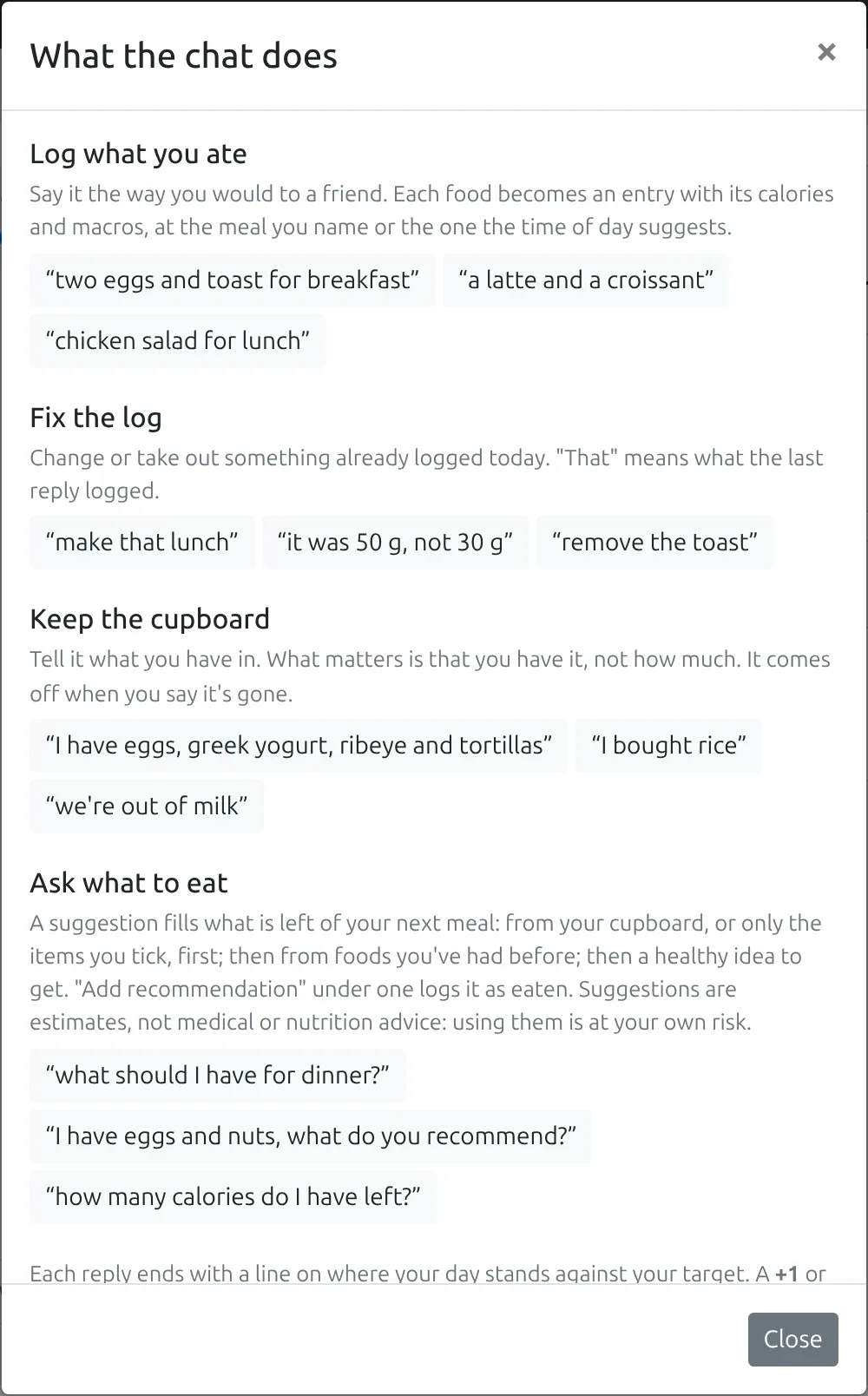
What the chat does lists its four jobs (log what you ate, fix the log, keep the cupboard, and ask what to eat), each with a line on how it works and a few examples. Choosing an example puts it in the message box, ready to send or change.
One message can hold several foods. Each becomes its own entry with five numbers: calories, protein, carbs, fat and fiber.
The more you say, the closer the numbers. “A coffee” is a guess; “a 350 ml oat latte” is much less of one. Weights, sizes, brands and how it was cooked all help. If you have the label, give its numbers and they’re used.
Which meal it goes to
Section titled “Which meal it goes to”If you name the meal, that’s where it goes. If you don’t, NoshChat goes by what you said and the time you said it: a message at 8 a.m. lands on breakfast, at 1 p.m. on lunch.
Meals you’ve turned off in Settings are never used: anything that would land on one goes to the nearest meal that’s on.
Foods you’ve logged before
Section titled “Foods you’ve logged before”NoshChat remembers every food you log, with your own numbers. Next time you mention it, it starts from those rather than a fresh estimate, so your “oatmeal” stays your 150 kcal bowl. See Remembered foods.
What comes back
Section titled “What comes back”The reply says what it did, for example:
Logged 520 kcal to lunch.
Under it, each food is listed with its numbers, and each one is a link to edit it. Below that is a short line on where your day stands: what’s left of your target and what to eat next.
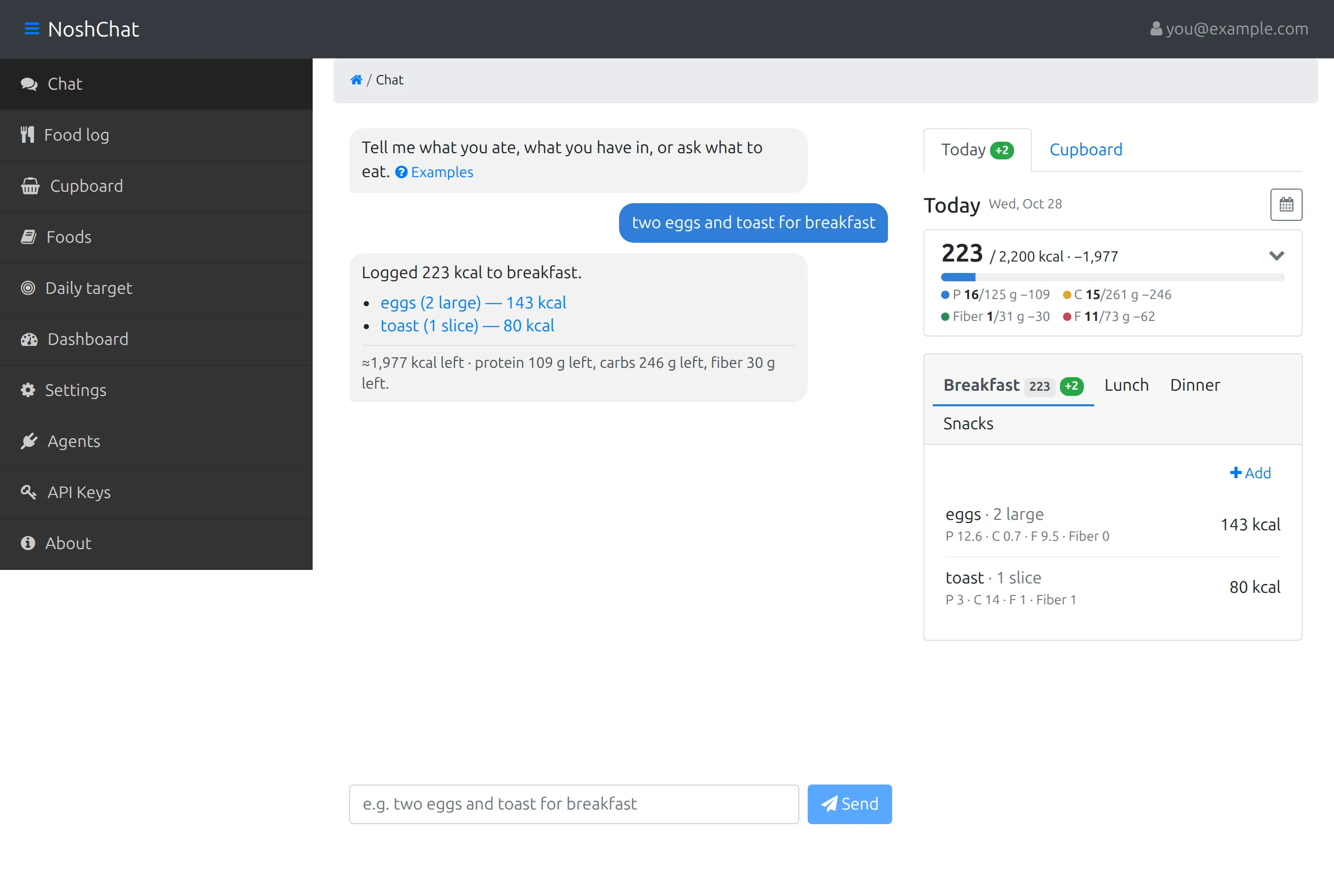
Here, one message became two entries at breakfast, eggs and toast, each with its serving and calories. The reply starts with the total it logged, and each food under it is a link to edit it. The last line is where the day stands: the calories left, and which macros are short of their targets.
The Today tab beside the chat updates as you go. For 15 seconds after a message changes something, a +1 or −1 appears next to the tab it changed.
Fixing the log
Section titled “Fixing the log”Tell the chat what’s wrong. It changes, removes or adds entries in today’s log:
make that lunch
it was 50 g, not 30 g
remove the toast
it was a bagel, not toast
“That” means what the last reply logged.
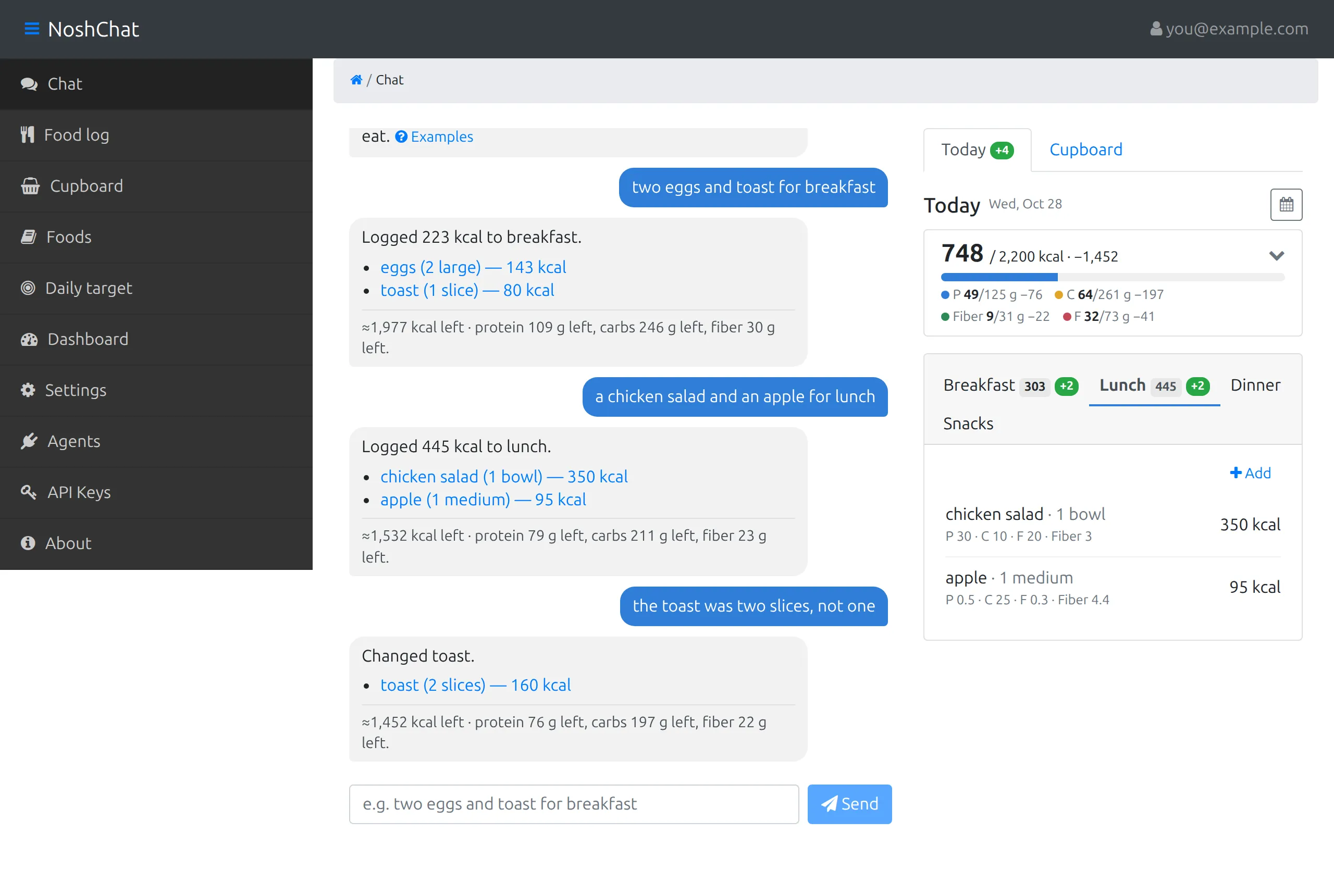
The last reply says what changed (Changed toast.) and shows the entry as it is now, two slices with their calories. The line under it is the day again, with lunch counted too. On the right, breakfast’s total has gone up by the extra slice.
If a message would clear several things at once, such as “remove everything from breakfast”, the chat checks first: That clears several things at once. Go ahead? Choose Yes, go ahead or No.
Fixing it by hand
Section titled “Fixing it by hand”Every entry can also be edited on its own. Choose it under the chat’s reply, or from Food log, and change the food, the serving, the meal or any of the numbers. Type a new serving and, once you leave the box, the numbers are worked out again to match it. Nothing is saved until you choose Save.
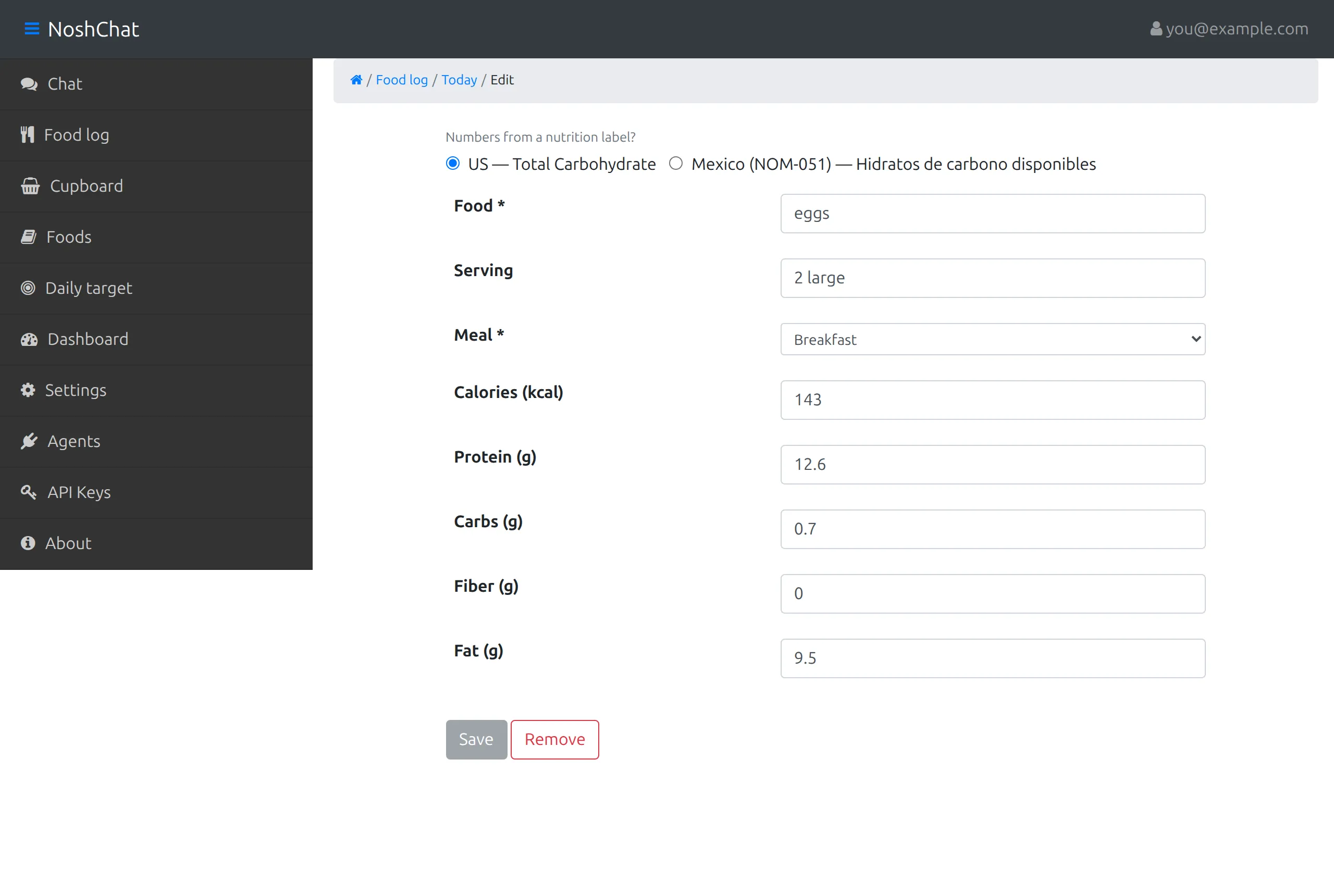
Every field of the entry can be changed here; Save keeps the change and Remove deletes the entry. If you’re copying numbers from a nutrition label, choose which kind first: a US label’s Total Carbohydrate already includes fiber, while a Mexican label’s Hidratos de carbono disponibles leaves it out, so NoshChat adds the fiber back to get total carbs.
You can add food without the chat too: open a day in Food log and choose Add food, or Add on a meal. Foods you’ve logged before appear as chips, so one tap fills them in.
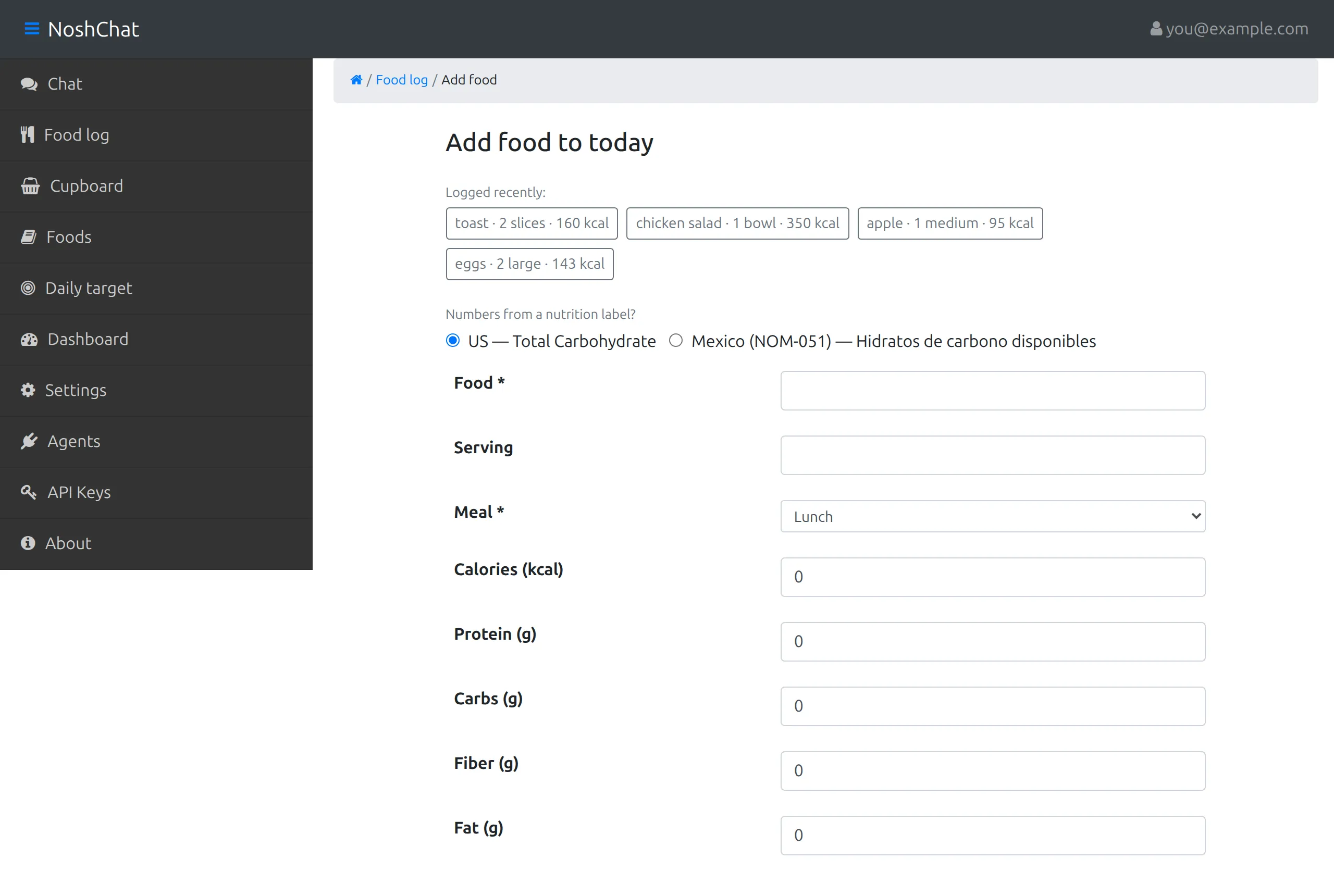
Under Logged recently are your remembered foods, each with its serving and calories. Typing narrows them, and tapping one fills the form with its serving and numbers. The meal starts at the one the time of day suggests.
When it isn’t sure
Section titled “When it isn’t sure”If it can’t tell whether you’re telling it about food, it asks: Is this something you ate or drank? Choose Yes, log it to log what it found, or No to leave the log alone.
If a message isn’t about food at all, it says so and logs nothing.
Logging and your cupboard
Section titled “Logging and your cupboard”If you keep a cupboard, what you eat comes out of it: say “I had two of the eggs” and the eggs go from 6 to 4. One message can also do both, for example:
I had two eggs, and I bought tortillas
logs the eggs and puts the tortillas in the cupboard.
Telling it how you eat
Section titled “Telling it how you eat”Mention an allergy, a food you never eat or would rather not, a diet, a cuisine you like or how long you’ll cook, and the chat offers to save it to your settings:
I’m allergic to peanuts
comes back with Never suggest: peanuts and two buttons. Save to settings adds it, and suggestions keep to it from then on; No thanks leaves your settings as they were. Nothing is saved until you choose. It works beside anything else you say too: “I’m vegetarian, what should I have for dinner?” gets its suggestion, and the offer under it. The chat only ever adds; to take something off, use Settings.
Asking instead of telling
Section titled “Asking instead of telling”Ask a question and you get a suggestion instead of a log entry:
what should I have for dinner?
how many calories do I have left?
A suggestion is one option for your next meal, sized to fill what’s left of it, with its calories, protein, carbs, fat and fiber. It’s built from your cupboard first; if that can’t make a good meal, from foods you’ve had before; and failing that, it’s a healthy idea with a Get: line of what to buy. If you’d like it, choose Add recommendation under it, and it’s logged as eaten.
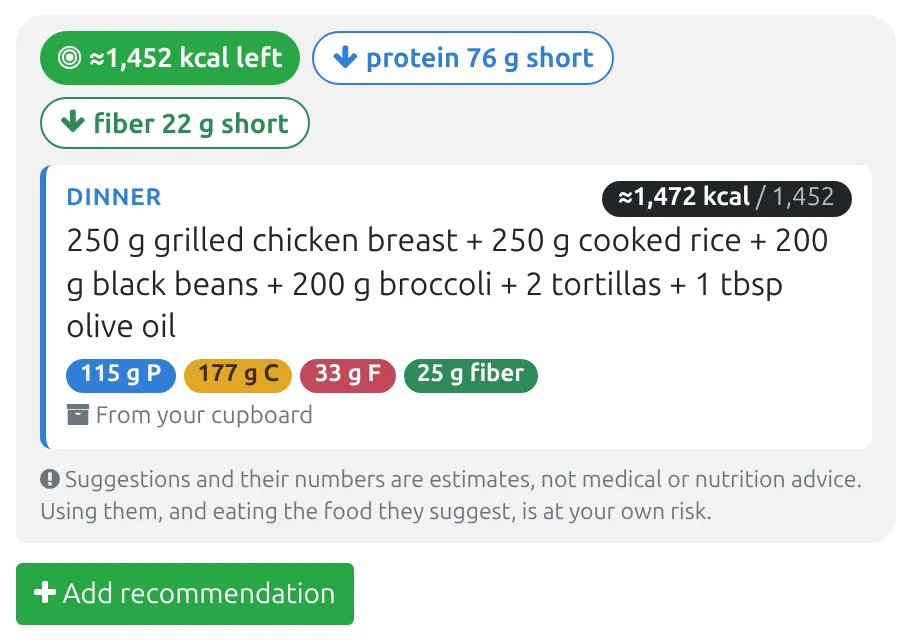
The chips at the top are where your day stands: the calories left, and any macro running short. The card is the option: which meal it’s for, what to eat with amounts, its calories against what’s left of the meal, then its protein, carbs, fat and fiber. The line under that says where it came from, From your cupboard here. A suggestion that needs shopping has a Get: line too. Add recommendation logs it as eaten.